How to Query NFL Odds and Player Props
September 18, 2025 · Updated October 22, 2026
How to Query NFL Odds and Player Props
If you’re new to querying the SportsGameOdds API, this guide is designed to help you hit the ground running. We’ll use the NFL as an example to walk through the /v2/events endpoint in Postman, covering everything from basic requests to more advanced queries like filtering player props and using oddIDs.
For full market coverage and pricing, see the NFL odds API page, or the football odds API if you also need college football, CFL, USFL or XFL. Every query pattern in this guide works for NCAAF by swapping the leagueID — see the college football guide for the differences worth knowing.
Endpoint examples
The goal is to give you practical, copy-and-paste examples you can adapt for your own projects, while also highlighting best practices to keep your calls efficient and results tailored to your needs.
Whether you’re building a betting app, a DFS tool, or simply exploring sports data, this guide will show you how to:
- Query events and player props with the NFL as a working example.
- Use parameters like
leagueID,oddIDs, andbookmakerIDto filter results. - Speed up response times with smart parameter choices.
- Access supporting documentation, Postman collections, and examples to go further.
We’ll walk through the /v2/events endpoint with an NFL example, and highlight the parameters worth knowing along the way.
Reference and tooling
Here’s the reference docs on the /v2/events endpoint: /docs/reference#tag/events/GET/events/
This gives you info on all the fields you can include in your requests. Most are optional.
Link to Postman Collection: /postman-collection
Odds Query Examples
If you want to fetch events with player props the easiest way would be this:
This returns you player props in addition to all of the other markets.
If you want to get more fine-grained with the specific NFL player props you want, you can do something like this:
That will give you the over-unders on NFL rushing yards for all players. Note that the “PLAYER_ID” value is a special value which means “any playerID”, but if you swap PLAYER_ID with a specific player’s playerID then you’ll get odds for only that player like so:
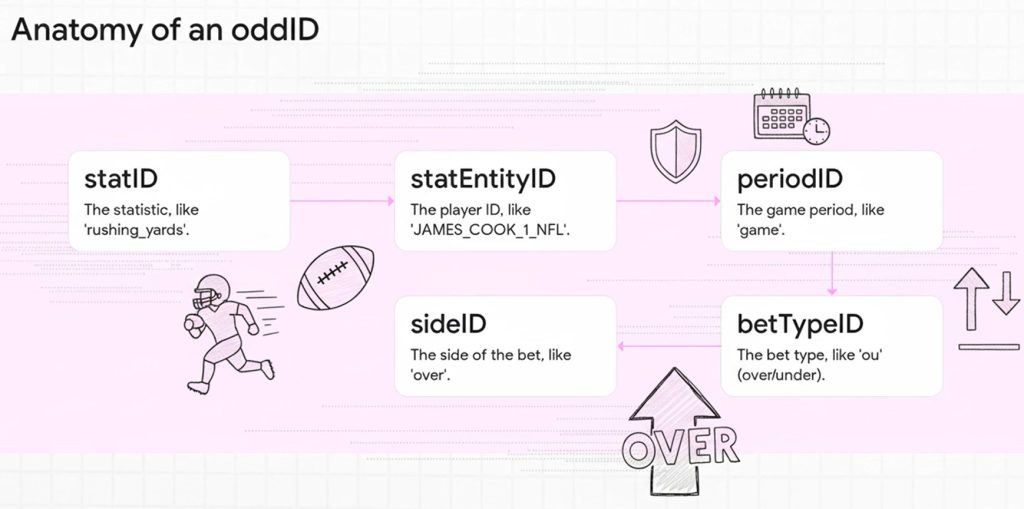
As you can see in those NFL football examples, you’re able to provide a comma separated list of any oddID values. The oddID values are basically a bet and they take the following format: {statID}-{statEntityID}-{periodID}-{betTypeID}-{sideID}
Five parts stitched together: the statistic, the entity it belongs to (a player for props, or home/away/all for team and game markets), the period, the bet type, and the side. Once you have the structure, you can build a query for any market in the catalog.
Here’s a guide from our docs which lists all of our supported markets: Supported markets — filter the table to Football to see every NFL oddID
A few extra notes:
- We highly recommend trimming down the list of oddIDs to only include the ones you’re actually interested in.
- We also recommend you include a bookmakerID param (ex: bookmakerID=fanduel,draftkings,prizepicks,underdog)
- The above two params will greatly speed up your response time
- By having the param includeOpposingOdds=true you make it so you only need to list the odds for the over sideID and it will automatically include the under odds too.
- You can also add includeAltLines=true to get the alt lines for each market but be careful about doing so as it can slow response times and increase response size.
Next Steps
Now that you’ve seen how to query NFL data using our /v2/events endpoint, you’re ready to start experimenting with your own use cases. We recommend:
- Exploring more markets: Check out our Markets Guide for a full list of supported bet types.
- Testing with different bookmakers: Add the
bookmakerIDparameter to focus on the operators most relevant to your project. - Optimizing queries: Use
includeOpposingOdds=trueandincludeAltLines=truecarefully to balance detail with performance. - Building beyond NFL: Swap
leagueID=NFLwith any other supported league to unlock odds across 28+ sports and 67+ leagues.
If you’d like to dive deeper, here are some helpful links:
- Full API Reference
- SportsGameOdds SDK Guide
- Postman Collection
- Join Our Discord to connect with other developers and get support
And of course, if you have any questions, our support team is here to help.
Read More: MLB Odds API Guide | NBA Odds API Guide | Every NFL betting market we cover
Ready to get started?
Join thousands of developers building the next generation of sports and betting applications.